
Quick answer
A food truck spreadsheet template should help you decide whether an event is worth the truck.
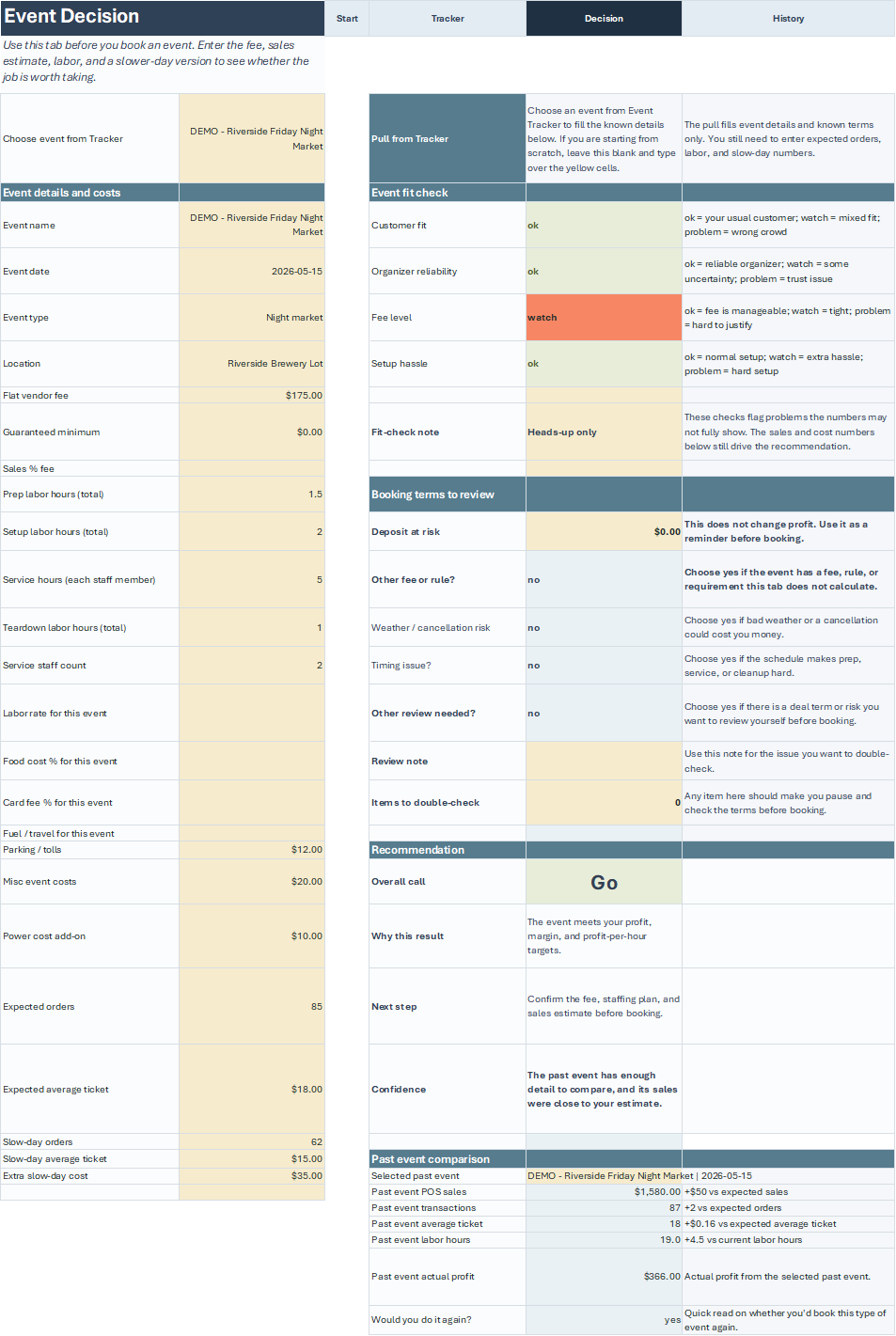
Use a food truck spreadsheet template when the decision depends on event numbers: expected sales, food cost, labor, travel, vendor fees, other costs, downside risk, and what happened after the event.
Template fit
Why operators search for a food truck spreadsheet template
Most operators searching for a food truck spreadsheet template are not looking for another blank grid. They need a practical place to compare event opportunities, quote assumptions, vendor fees, costs, and results without rebuilding the same sheet every time.
A focused template should help answer the question that comes up again and again: is this event worth the truck, crew, prep, and date? A generic spreadsheet can hold numbers, but it does not tell you which numbers matter.
Event estimates
Expected sales, average order, food cost, labor, travel, vendor fee, and a downside case.
Quote support
Minimums, service windows, guest counts, deposits, and the assumptions that support a catering quote.
Event history
Actual sales, cost notes, weather, placement, vendor count, sell-outs, waste, and whether you would return.
Tool handoff
The spreadsheet handles event ROI while the Quote Calculator and Booking Manager handle quoting and inquiry follow-up.
What to track
What a food truck spreadsheet template should track
The strongest template is not the one with the most tabs. It is the one that keeps the operator focused on the decision. For event work, that means separating assumptions from actual results and keeping enough notes to understand why an event did or did not work.
| Category | Fields to track | Why it matters |
|---|---|---|
| Sales assumptions | Expected sales, average ticket, buyer count, service speed, and capacity. | Helps you compare the organizer’s pitch against what the truck can actually serve. |
| Event costs | Food, packaging, labor, travel, vendor fee, power, permits, parking, lodging, and extra supplies. | Prevents the event from being judged by sales alone. |
| Risk notes | Weather, vendor count, menu overlap, placement, hours, alcohol, seating, and organizer history. | Shows why the same sales estimate may be safer at one event and risky at another. |
| Actual results | Sales, costs, labor, notes, sell-outs, waste, and return decision. | Turns each event into useful history for the next quote or vendor fee decision. |
Comparison
Blank spreadsheet vs. focused event workbook
A blank spreadsheet is flexible, but flexibility can become another chore during a busy week. The operator still has to decide which inputs to use, how to compare events, and how to remember the result later. A focused workbook starts with the questions food truck operators already need to answer.
| Option | Best fit | Tradeoff |
|---|---|---|
| Blank spreadsheet | Operators who already know exactly what they want to track. | Fast to start, but easy to miss labor, downside risk, or post-event notes. |
| Generic business template | Broad monthly tracking, startup planning, or basic expense lists. | May not fit food truck event decisions, vendor fees, or guest-paid risk. |
| Event ROI Workbook | Comparing food truck events, vendor fees, expected sales, costs, and event history. | Focused on event decisions, not full bookkeeping or tax reporting. |
| Full software platform | Teams that need cloud users, automations, contracts, payments, or POS integrations. | More power, but often more cost and setup than a small operator needs for event review. |
Examples
Food truck spreadsheet examples by event type
Different events need different notes. A corporate lunch is mostly about quote assumptions and final count. A festival is about vendor fee, buyer count, service speed, and downside case. A recurring brewery is about whether the location improves over time.
Festival application
The event charges $500 for a two-day food truck space.
Track expected sales, fee, crew, travel, menu speed, weather exposure, vendor count, and the sales needed to hit target profit.
Brewery pop-up
The venue says past trucks do well but cannot provide numbers.
Start with a modest sales case, record actual sales by date and weather, and decide whether the location earns a higher commitment later.
Corporate lunch
The client needs a quote for 90 staff with a two-hour service window.
Track guaranteed count, menu package, labor, travel, minimum, deposit, and whether actual prep matched the quote assumptions.
Apartment event
Residents pay individually and the property manager promises promotion.
Track resident count, promotion plan, sales, shortfall terms, and whether a minimum guarantee is needed next time.
Routine
How to use the spreadsheet after the event
The spreadsheet becomes more valuable after the event is over. That is when you can compare the number you expected against the number you actually sold, the labor you planned against the hours you really worked, and the fee you accepted against the return you got.
Do the review while the details are still fresh. Waiting until the next time the organizer calls usually means the weather, placement, vendor mix, and service notes have already blurred together.
Enter actual sales
Use POS totals or your sales report to record the event result, not the organizer estimate.
Update labor and costs
Add prep, travel, service, breakdown, cleanup, extra supplies, and any fee that changed after booking.
Write the event notes
Capture weather, placement, foot traffic, vendor count, menu issues, sell-outs, waste, and organizer communication.
Mark the return decision
Decide whether you would return as-is, ask for better terms, change the menu, require a minimum, or pass.
Compatibility
Compatibility and file habits
The Event ROI Workbook is built as a spreadsheet product, so good file habits matter. Keep a clean original, save a working copy, and avoid editing protected formulas unless you are intentionally customizing the workbook.
Excel-first workflow
Use the workbook in a modern spreadsheet app that can handle formulas, formatting, and protected workbook structure.
Save working copies
Keep a blank original and duplicate it for each season, year, or operating period.
Export key reports
Export or save important event reviews so you are not relying on memory after busy weekends.
Check compatibility
Read the compatibility page if you plan to use non-Excel software or have strict device requirements.
Bundle fit
How the spreadsheet fits with the other tools
The spreadsheet is strongest after an event opportunity appears. It helps you decide whether the event makes financial sense and keeps history for future decisions. The Quote Calculator and Booking Manager cover different parts of the same operating week.
| Tool | Use it when | Main job |
|---|---|---|
| Quote Calculator | A private event needs a price, minimum, deposit, and service terms. | Build the quote before sending it to the client. |
| Booking Manager | An inquiry needs follow-up, status, deposit tracking, logistics, and prep notes. | Keep the booking from getting scattered across texts and email. |
| Event ROI Workbook | A public event, vendor fee, or repeat opportunity needs a profit check. | Compare assumptions before the event and record actual results afterward. |
FAQ
Food Truck Spreadsheet Template for Event ROI and Catering Decisions FAQs
What should a food truck spreadsheet template include?
A food truck spreadsheet template should include event sales assumptions, food and packaging cost, labor, travel, vendor fees, other event costs, downside case, and actual results after the event.
Is this spreadsheet for bookkeeping?
No. The Food Truck ROI spreadsheet is focused on event ROI and event history. Use your accounting process for taxes, payroll, inventory, and full business financial statements.
Can I use a blank spreadsheet instead?
Yes, if you already know what to track and how to compare events. A focused template saves time by starting with the inputs food truck operators usually need for event decisions.
What is the difference between a spreadsheet template and booking software?
A spreadsheet template is best for numbers, assumptions, and event review. Booking software is better for inquiries, calendars, contracts, payments, automations, and multi-user workflows.
Should I track actual results after every event?
Yes. Actual sales, costs, labor, weather, placement, and vendor count become more useful than broad averages when you are deciding whether to return, negotiate, or pass next time.
Does the workbook guarantee an event will be profitable?
No. It helps you compare assumptions and record results. Profit still depends on sales, costs, weather, staffing, menu speed, placement, and event execution.