Step 01
Use the Free Calculator
When a catering inquiry first comes in, check whether the job is worth quoting before you spend time building the full price.

How it works
Use Food Truck ROI when a catering request or vendor event needs more than a quick guess: check the minimum, build the quote, keep the booking notes together, and review the numbers after service.
Workflow map
A private lunch, a wedding snack, a brewery pop-up, and a festival booth do not all start with the same problem. Food Truck ROI helps you use the right tool first, whether you need a quick minimum, a quote, a booking record, or an event review.
When a catering inquiry first comes in, check whether the job is worth quoting before you spend time building the full price.
Build the private-event quote from the menu, packaging, crew, travel, service time, deposit, and minimum terms.
Keep the client, date, location, final count, deposit status, follow-up date, parking, power, and prep notes together.
Before you pay a vendor fee or go back to the same event, compare the fee, expected sales, labor, travel, and past results.
The repeatable path
The numbers matter, but the details around them matter too. The goal is to keep the client request, quote, deposit, prep notes, and post-event review in one place before the next event pushes the details out of memory.
Private-event example
The request sounds simple: weekday lunch, 80 employees, a two-hour service window, and one host-paid invoice. Before you reply with a price, check the menu, crew, travel, setup access, service speed, deposit, and final count deadline. If the job makes sense, the quote and booking notes stay together instead of getting split between email, texts, and memory.
Use the 80-person count, two-hour lunch window, menu, travel time, crew, and setup needs to see whether the job clears your minimum.
Turn the approved menu, final count deadline, deposit, balance due date, taxes or fees, and service terms into the quote you send back.
Track the contact, event address, delivery or service timing, parking, power, final count, deposit status, and next reply date.
Record what changed: actual headcount, prep time, labor, sales, late requests, and anything you would price differently next time.
Public-event example
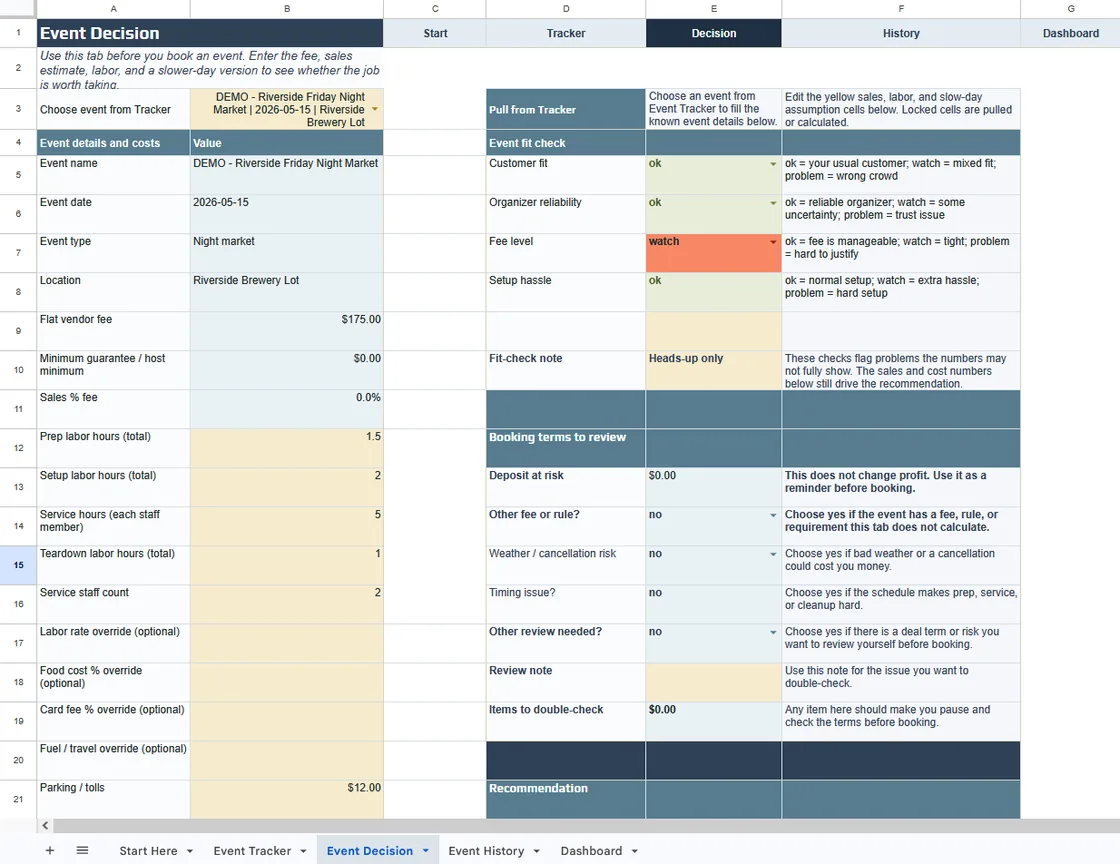
The organizer may expect a good crowd, but the truck still carries the risk. Before paying the fee, compare the schedule, vendor count, past food sales, labor, prep, travel, weather exposure, and slow-sales case. Afterward, save what actually happened so next year's decision is based on sales and notes, not whether the day seemed busy.
Start with the vendor fee, service hours, arrival time, power access, food vendor count, and refund policy.
Ask for past food vendor sales, not only attendance. A large crowd does not always mean enough buyers for your menu.
Compare the fee, labor, food prep, travel, and slow-sales scenario before you block the date.
After the event, save actual sales, weather, other food vendors, wait times, and notes so next year is based on records, not memory.
Files and backups
Food Truck ROI is for operators who want practical quoting, booking, and review tools without moving the whole business into another monthly platform.
The Event ROI Workbook is an .xlsx file. Keep a blank master copy and save a dated copy for each event you want to review later.
The Quote Calculator and Booking Manager run in a modern desktop browser. They are built for the desk work behind the event, not for taking orders at the window.
Export your browser-local data regularly, especially before clearing browser data, switching devices, or using private browsing.
The toolkit does not process payments, sync calendars, manage inventory, file taxes, or replace your event agreement.
FAQ
These answers cover the setup, tool choice, storage, and limits operators usually want to know before using the toolkit.
Start by collecting the basics: event date, location, guest count, service window, menu expectations, payment setup, parking or access details, and whether the host expects a minimum or guarantee. Then check the numbers before sending a price.
For private catering, the toolkit helps you check the minimum, build the quote from food cost, labor, travel, service time, deposits, and terms, then keep the booking details together for follow-up and prep.
For public events, use the Event ROI Workbook to compare the vendor fee, expected sales, labor, food cost, travel, and slow-sales case before you commit the truck.
No. It does not collect online bookings, process payments, sync calendars, send automated reminders, or manage inventory. It is a lighter set of tools for quote math, booking notes, and event review.
The Booking Manager is designed around browser-local working data. Export backups regularly, especially before changing devices, clearing browser data, or working in private browsing.
The pages may open on a phone, but the quoting, booking, and workbook work is best on a desktop or laptop where you can see the event details clearly.
Start with the free calculator when you only need a quick minimum. Preview the full toolkit when the event needs quote math, booking notes, and a review you can learn from later.
Preview the toolkit