Private-event quotes can hide missing costs.
Without a clear minimum, labor, travel, setup, packaging, and deposit terms can get buried inside a number that looks fine until the event is over.

Food Truck Event Profit Toolkit
A digital toolkit preview for food truck operators who need a practical way to price private events, organize inquiries, and review event profit without paying for monthly software.
Preview the workbook, quote calculator, and booking manager before launch.
The operator problem
A packed brewery night, a corporate lunch, and a festival can all look good at first. The real question is whether the fee, labor, travel, prep time, minimum, and follow-up make the job worth taking.
Without a clear minimum, labor, travel, setup, packaging, and deposit terms can get buried inside a number that looks fine until the event is over.
A booth fee only makes sense after you compare expected sales, food cost, crew hours, weather risk, organizer history, and what the truck could earn elsewhere.
Text threads, emails, calendars, and sticky notes work until a deposit, follow-up date, power need, parking detail, or final count slips through.
Why it matters
Private event
A private event can look profitable until you add prep, crew, travel, packaging, cleanup, and the service window you blocked off.
Vendor fee
A vendor fee, long load-in, slow turnout, and too many similar trucks can turn a busy-looking opportunity into a low-margin day.
Follow-up
A lead you already worked to get can disappear when the quote, deposit, next step, and event notes are not kept in one place.
What you get
Use the toolkit when you want a practical event workflow without signing up for a full booking, POS, accounting, or catering-operations system.
Keep a clean backup copy before working on live events, and export browser-tool data regularly.
The simple workflow
The toolkit is built around three parts of event work that small operators handle over and over: pricing the job, keeping the lead organized, and checking whether the event was worth the time.
Use the Quote Calculator to build a private-event quote from costs, minimums, deposits, and service details.
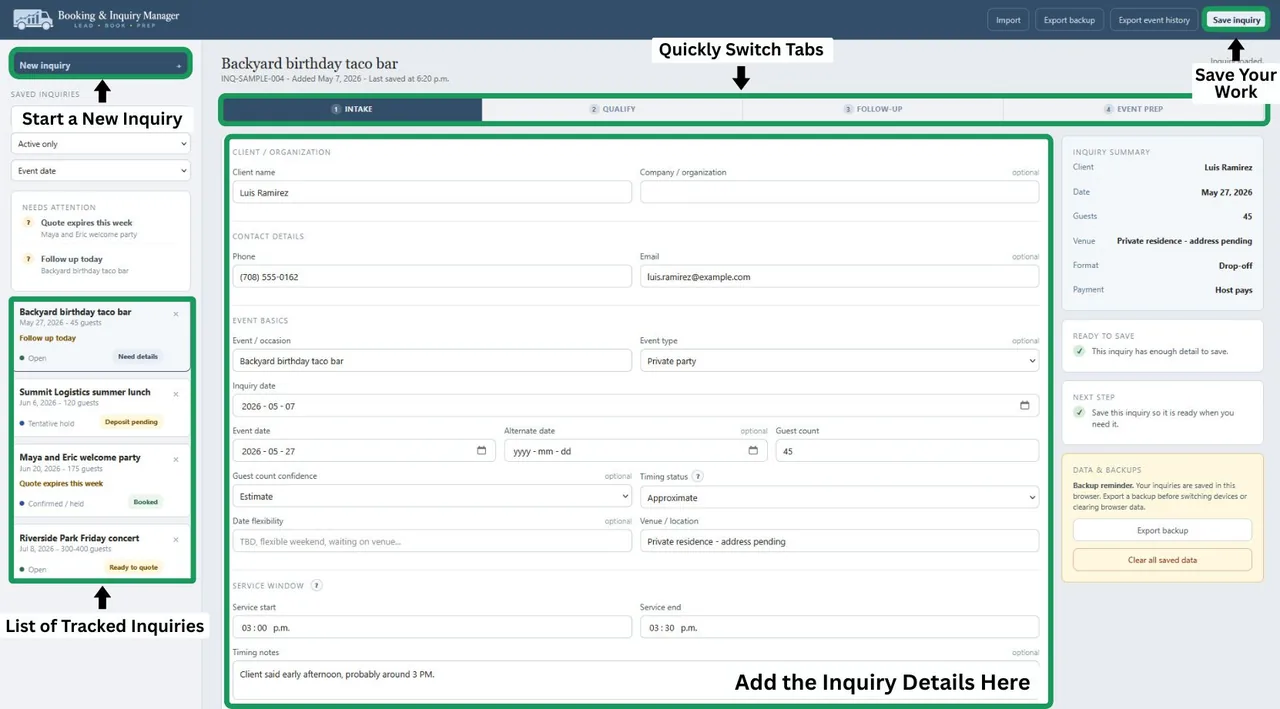
Use the Booking & Inquiry Manager to track status, follow-up, deposit, logistics, and prep notes.
Use the Event ROI Workbook to compare fees, sales estimates, cost assumptions, downside risk, and past results.
What's included
Each tool has a specific job. Together, they replace the scattered spreadsheet, inbox, notes app, and mental math many operators use to manage event work.
Compare vendor fees, expected sales, food cost, labor, travel, and event history before you commit to a public event or paid spot.
Helps avoid: Taking a busy-looking event that does not leave enough margin.
Build private-event quotes with minimums, deposits, travel, labor, service windows, and client-facing quote notes in one place.
Helps avoid: Underquoting private events or sending a quote that leaves too much unclear.
Track inquiries, event details, quote status, deposit status, follow-up, logistics, and prep notes without moving between scattered notes.
Helps avoid: Losing the follow-up, deposit, setup, or event-day details after the first call.
Product previews
These previews show the three jobs the toolkit is built around: event profit, private-event quotes, and booking follow-up.
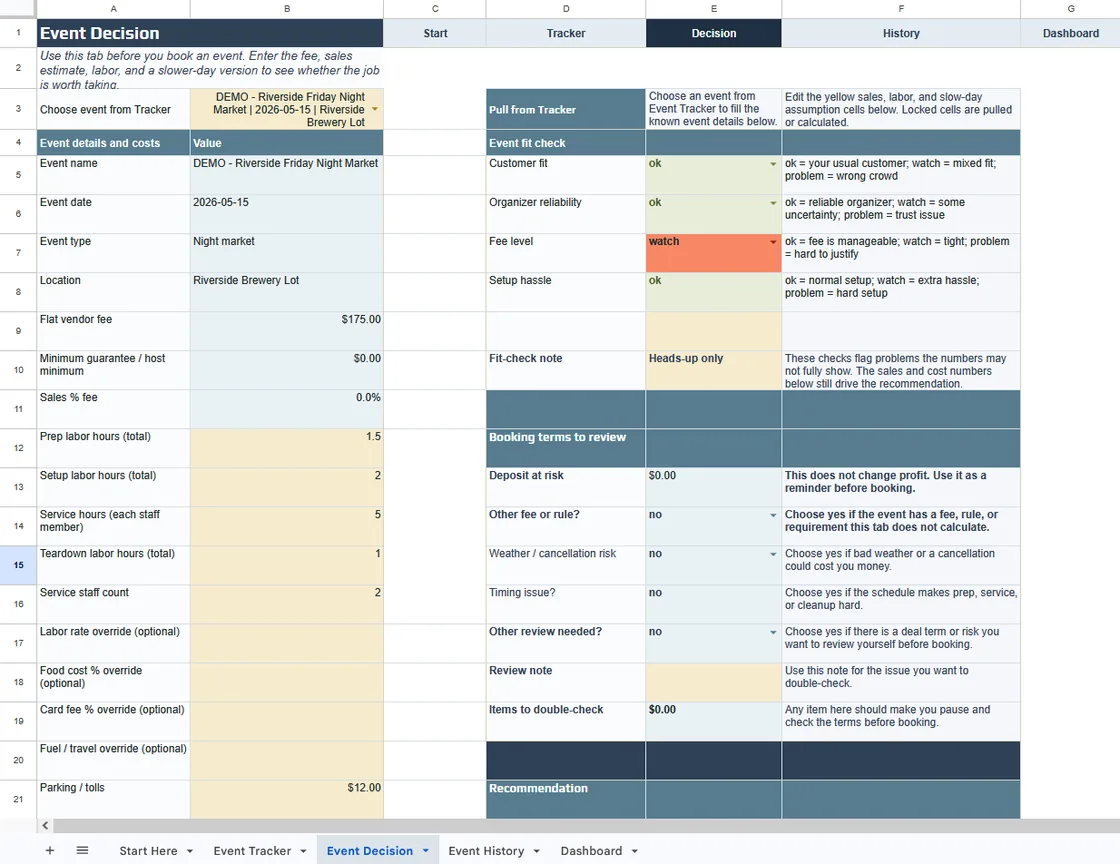
Use the workbook before a vendor-fee event to check the fee, expected sales, food cost, crew, travel, and slower-day downside case.
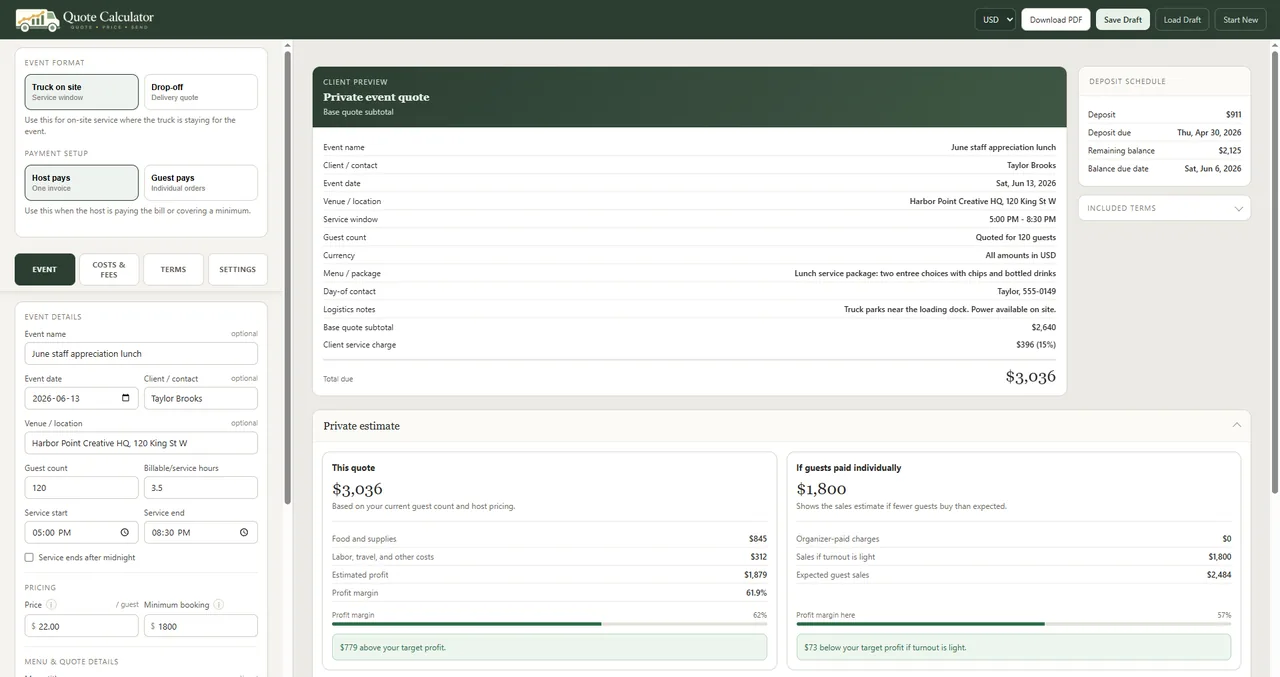
Price a private event from guest count, menu, labor, travel, minimums, deposits, and service details before you send the number.
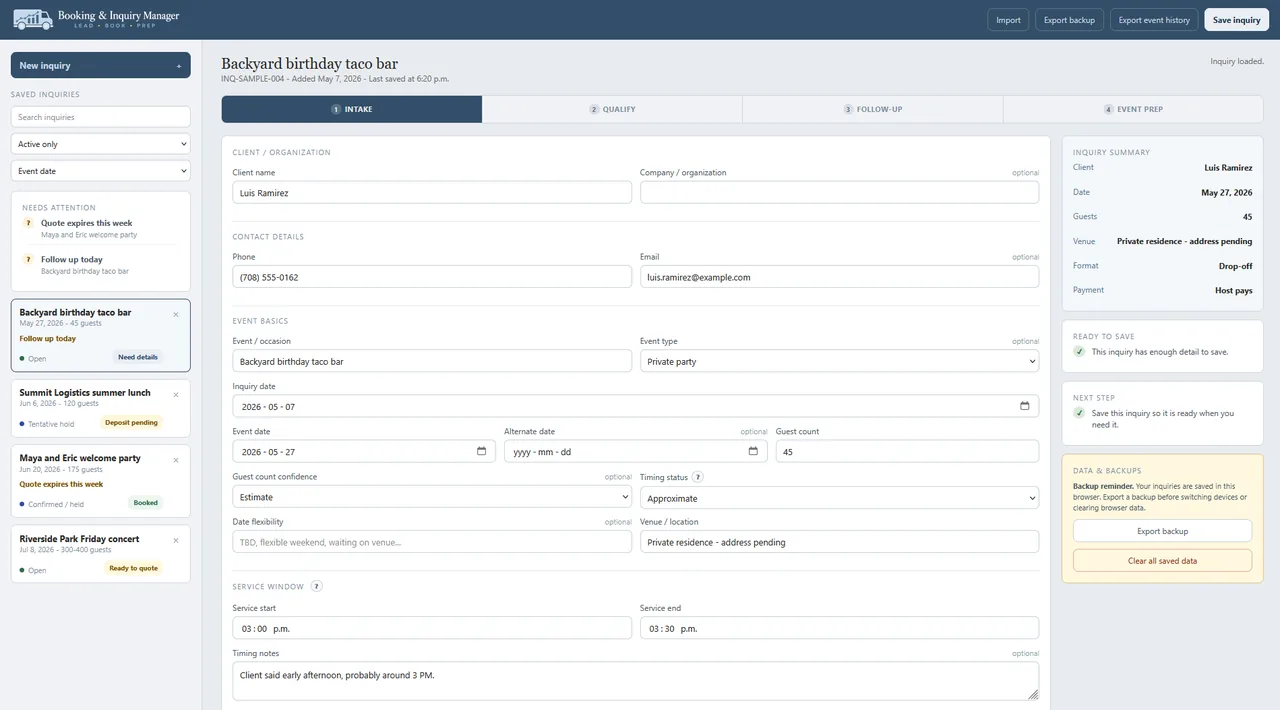
Keep the lead, quote status, deposit, follow-up date, site details, prep notes, and backup exports in one local browser tool.
See what the toolkit produces
The screens show the tools. These examples show the work the toolkit helps you finish: a quote, a booking record, and a numbers check before or after an event.
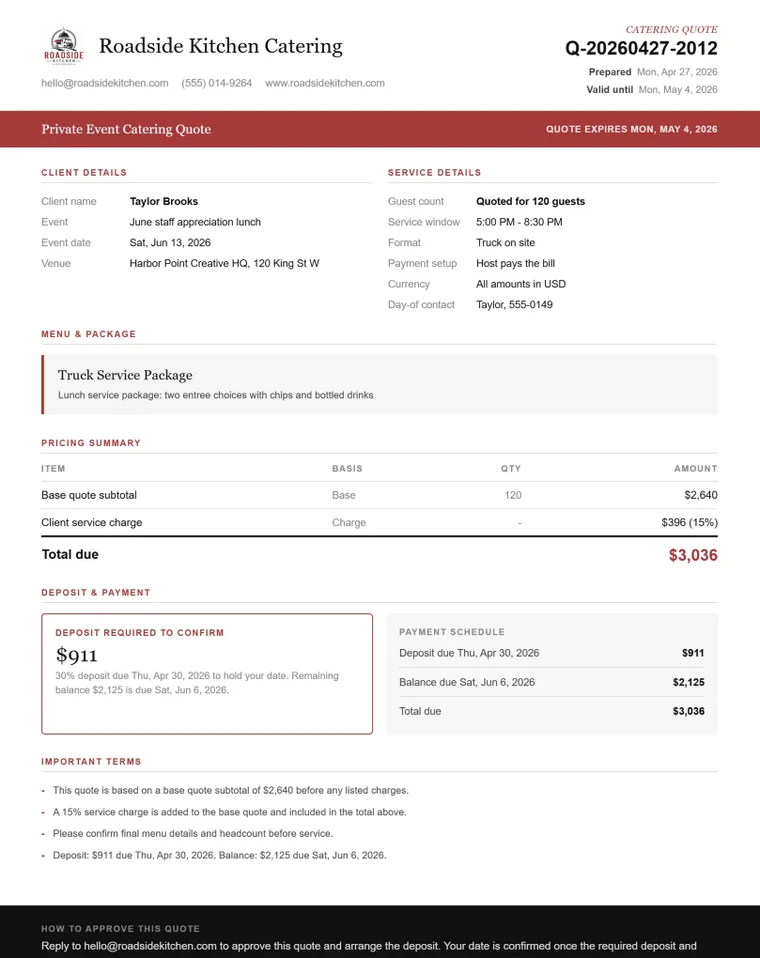
Sample quote output
The quote example shows the details a client expects to see: event date, guest count, service window, package, deposit, payment schedule, quote expiration, and terms.
Booking record
The Booking Manager keeps the inquiry, next step, saved leads, event basics, and backup actions visible so a good catering lead does not get lost after the first message.
ROI workbook
The workbook helps you check a vendor-fee event against fee level, organizer reliability, setup hassle, sales assumptions, labor, and the review notes you will want next season.
Full workflow
How it compares
| Option | Best for | Limitation |
|---|---|---|
| Free spreadsheet | Basic notes or a one-off tracker. | Usually not built around quoting, booking, and event review together. |
| Monthly catering or CRM software | Teams that need cloud accounts, online booking, automation, contracts, or payments. | More setup and monthly cost than many owner-operators need. |
| Food Truck Event Profit Toolkit | Small operators who want a one-time toolkit for quotes, booking notes, vendor fees, and event ROI. | Not a full CRM, POS, accounting system, or payment processor. |
Fit check
This toolkit is for operators who want cleaner event math and booking notes. It is not a replacement for POS, payroll, contracts, or a full catering platform.
Good fit
Not a fit
Launch list
The Food Truck Event Profit Toolkit is being prepared for launch. Join the list and I will send a short update when the toolkit is available.
This list is for Food Truck ROI launch updates only. The form should ask for your email and a few optional details about the type of event work you handle.
Compatibility and limits
Excel file
The Event ROI Workbook is an Excel-compatible spreadsheet file and does not use macros.
Desktop browser
The Quote Calculator and Booking Manager run in modern desktop browsers.
Browser data
Booking data is stored locally in the browser. Export backups regularly.
Clear limits
This is not POS, payment processing, accounting, inventory, online ordering, contracts, or a full CRM.
Useful next step
Start with the booking request form when the lead is missing details, or the serving capacity guide when the guest count or service window looks tight. The toolkit gives you a practical way to check a food truck quote, organize the booking, and review event ROI with files you can keep on your own computer.
Join the Launch ListFAQ
Short answers on files, compatibility, support, and where the toolkit fits in your food truck business.
The toolkit is being prepared for launch. Join the launch list if you want to be notified when it is available.
You will get product launch updates for the Food Truck Event Profit Toolkit. The list is for launch updates, not daily emails or general food truck marketing.
The planned toolkit includes the Food Truck Event ROI Workbook, the Catering / Private Event Quote Calculator, the Booking & Inquiry Manager, the Quick Start Guide, and backup/export instructions.
The Event ROI Workbook is an .xlsx file, so Excel is recommended. The workbook does not use macros.
Google Sheets may open some Excel files, but the supported workbook is the .xlsx version. Check the compatibility notes before launch if you plan to use something other than Excel.
The browser tools are designed around local browser data, so exported backups matter when switching computers, clearing browser data, or changing browsers.
The Booking Manager stores working data in your browser, not in a cloud account. Private browsing, cleared browser data, device changes, and browser settings can affect stored data, so regular exports are important.
It is built for both. Use the Quote Calculator for private events and catering quotes, the Booking Manager for inquiries and event prep, and the Event ROI Workbook for vendor fees, public events, and post-event review.
You can edit the quote details you enter, adjust package notes, add terms, and download a PDF-style quote output from the Quote Calculator.
Support details will be published with the launch materials. The support page explains the intended support scope for access, setup, compatibility, and product issues.
Yes. The refund policy page explains the planned digital product refund approach and product-fit checks. Review it before the toolkit is available.
No. It does not replace POS, payment processing, accounting, inventory, online ordering, contracts, or a full CRM. It is a practical toolkit for quoting events, tracking booking details, and reviewing event ROI.
Join the launch list if you want to know when the quote, booking, and event review toolkit is ready.
Join the Launch List