
Quick answer
A food truck booking software alternative works when you need organization, not a full platform.
Use a lightweight booking tracker when inquiries are getting scattered across texts, DMs, calls, and email, but you do not need online booking, payment processing, automated reminders, contracts, or multi-user cloud software.
Tool fit
When food truck booking software is more than you need
Full booking software can be useful when you need online booking forms, contracts, payments, automatic reminders, calendar sync, multi-user cloud access, and a full client portal. Some food truck operators need all of that.
Many small operators are in a different spot. They get leads from texts, DMs, email, phone calls, referrals, brewery managers, office admins, and people walking up to the truck. They do not always need a monthly platform. They need a reliable place to track the inquiry, quote status, deposit, follow-up, and event-day details.
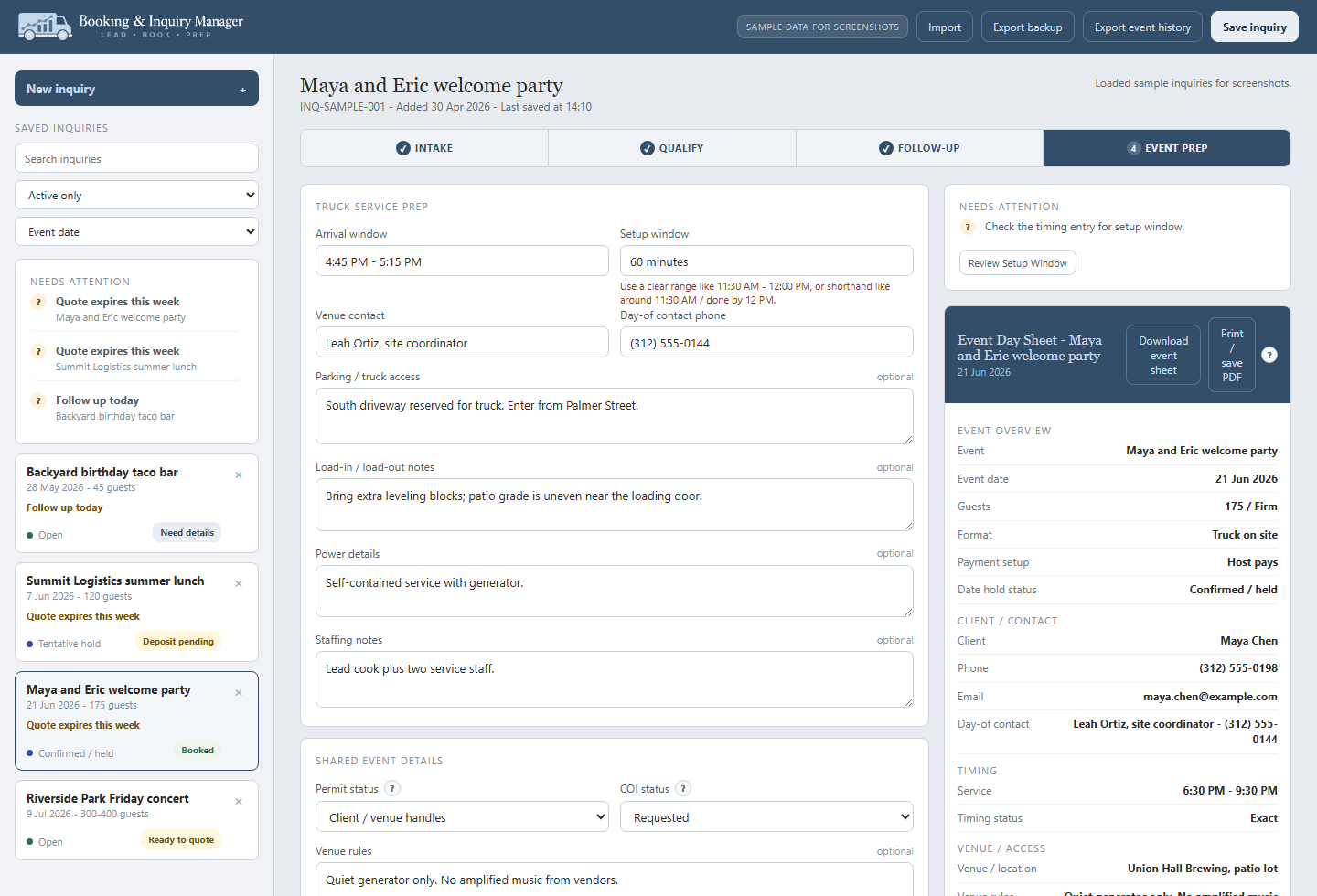
Inquiries
Client name, event date, location, guest count, format, source, and what still needs to be confirmed.
Follow-up
Quote status, follow-up date, deposit status, hold status, and the next step before the lead goes cold.
Booking notes
Parking, power, load-in, setup window, day-of contact, menu notes, and staffing reminders.
Exports
Local-first tools need regular exports so booking records are not trapped in a browser profile.
Comparison
Food truck booking software vs. a lightweight booking tracker
The best choice depends on how your operation handles leads. If every inquiry needs a contract, payment link, automated reminders, calendar sync, and a team login, use a full platform. If the main problem is scattered details and missed follow-up, a focused tracker may be enough.
| Option | Best fit | Tradeoff |
|---|---|---|
| Full booking software | Teams that need online forms, contracts, payments, automations, cloud accounts, and calendar workflows. | More complete, but usually more setup, monthly cost, and process change. |
| CRM or sales platform | Operators with a formal sales pipeline, staff handoffs, and broader customer management needs. | Powerful, but often built for general sales teams instead of food truck event prep. |
| Spreadsheet tracker | Operators who want a simple list of leads and can maintain their own structure. | Easy to customize, but easy to outgrow or let get messy. |
| Booking Manager | Small operators who need inquiry status, follow-up, deposits, logistics, and event prep without a monthly platform. | Focused on organization, not online booking, payments, or multi-user cloud collaboration. |
Booking details
What a food truck booking tracker should capture
A booking tracker should keep the details that usually get lost between the first inquiry and the event day. The goal is not to store every possible note. The goal is to make sure the operator can follow up, quote, prep, and show up without searching through five different apps.
| Booking field | Why it matters | Common miss |
|---|---|---|
| Inquiry source | Shows where the lead came from and helps judge future marketing. | The operator forgets whether the lead came from a referral, website form, Instagram, or past event. |
| Quote status | Keeps the lead from stalling after the first price is sent. | A quote expires or sits unanswered because no follow-up date was set. |
| Deposit status | Confirms whether the date is truly held. | A client thinks the date is reserved, but no payment or agreement was completed. |
| Final count deadline | Protects prep, ordering, and staffing. | The host changes the count too close to service and the truck absorbs the cost. |
| Power and parking | Affects setup, generator needs, service speed, and arrival time. | The truck arrives and finds no clear access, no outlet, or a bad parking spot. |
| Day-of contact | Gives the crew someone to call during load-in or setup. | The person who booked the truck is not on site when access problems start. |
Workflow
A simple booking flow for food truck inquiries
Food truck inquiries rarely arrive in a neat order. Someone may ask for a quote before they know the final count. A brewery may ask for a date before confirming vendor count. A wedding planner may know the venue rules but not the final service window. A useful booking tracker lets the record improve as details come in.
Capture the lead
Save the event date, contact, location, guest estimate, service format, and source as soon as the inquiry arrives.
Qualify the event
Check guest count, distance, service window, parking, power, budget, and whether a minimum or vendor fee applies.
Send and track the quote
Record the quote status, follow-up date, deposit terms, expiration date, and any client questions.
Prep the booking
Confirm final count, menu, load-in, setup window, day-of contact, crew, power, parking, and event notes.
Review the event
After service, record what went well, what changed, and whether the event deserves another booking.
Local data
Local-first tradeoffs and backup habits
A local browser-based booking manager can keep the workflow simple and avoid a monthly platform, but it comes with a tradeoff: browser-local data needs backup habits. If a browser profile is cleared, a device is replaced, or settings change, local data can be affected.
That does not make the tool weak. It means the operator should use exports the same way they use prep lists, sales reports, and event files: as part of the routine.
Export backups
Export inquiry and event records on a schedule that matches your booking volume.
Keep event sheets
Save or print key event-day details for booked events so the crew is not relying on one device.
Use one browser profile
Avoid switching between browsers or profiles unless you understand where the data is stored.
Check compatibility
Read the compatibility page if you use older devices, locked-down browsers, or unusual browser privacy settings.
Boundaries
What a lightweight booking tracker does not replace
A food truck booking software alternative should be honest about its limits. If an operator needs payments, legal agreements, team permissions, SMS automation, calendar sync, or customer portals, a lightweight tracker is not the right tool by itself.
That boundary is useful. It keeps the Booking Manager focused on the work small operators often need most: keeping the inquiry, quote status, deposit status, follow-up, and event prep details from getting lost.
Payment processing
Use your POS, invoice tool, or payment processor to collect deposits, balances, and guest payments.
Contracts
Use your own approved agreement or contract process for legal terms, cancellation policy, and client signatures.
Cloud team access
A local-first browser tool is not the same as a shared cloud platform with user accounts and permissions.
Automated reminders
The tracker can show follow-up dates, but it does not send automated texts, emails, or calendar reminders.
Best fit
Who should use this booking software alternative
The Booking Manager fits operators who are getting enough event inquiries that memory and scattered notes are no longer enough, but who do not want to adopt a full monthly booking platform. It is especially useful when the same person is selling, quoting, prepping, and working the truck.
One person handles the lead and the event
The same operator answers the inquiry, sends the quote, buys food, and works service.
A focused tracker keeps the details in one record without forcing a bigger sales platform.
A few people need a cleaner handoff
One person quotes the event and another person helps prep or work service.
Exported event notes and event-day sheets make handoffs cleaner than a long text thread.
Inquiries come from everywhere
Leads arrive through phone calls, Instagram, email, referrals, and in-person conversations.
The tracker gives every lead the same home even when the first message came from a different place.
You need contracts and payments built in
Your team needs online booking, payment collection, automated reminders, and cloud collaboration.
Use full booking software or a CRM instead of trying to make a lightweight tracker do platform work.
FAQ
Food Truck Booking Software Alternative for Small Operators FAQs
What is a food truck booking software alternative?
A food truck booking software alternative is a lighter way to track inquiries, quote status, deposits, follow-up, logistics, and event prep without adopting a full monthly booking platform.
When should I use full booking software instead?
Use full booking software if you need online booking forms, contracts, payment collection, automated reminders, calendar sync, cloud accounts, or multiple users working in the same system.
What should a food truck booking tracker include?
It should include contact details, event date, location, guest count, quote status, deposit status, follow-up date, final count deadline, parking, power, load-in, setup, menu notes, and day-of contact.
Does the Booking Manager process payments?
No. It tracks booking and deposit status, but it does not process payments or replace your POS, invoice, or payment processor.
Does a local booking tool sync across devices?
No. A local-first browser tool does not provide cloud sync. Use regular exports and backups if you rely on it for active booking records.
Can this replace a CRM?
It can replace a CRM only for operators whose main need is event inquiry organization. If you need broader customer management, automations, team pipelines, or marketing workflows, use a CRM.